Connection Settings
There are basically two types of connections that can be set up for delivering AutoSens data to your server. The first is a server setup to listen on a TCP port with the reader delivering a straightforward text -- CSV or JSON -- report each time the reader connects to the server to deliver data. The second is to connect to a server hosting a web server communicating using the HTTP protocol.
HTTP Data Delivery
Server connections can be set up to deliver data using the HTTP protocol, either through a clear channel or through a TLS encrypted channel. Generally, the server that the reader will be sending data to will be running a web service using cgi scripts to implement the interface. These interfaces will typically be RESTful and must accept POST requests for the data messages.
The syntax for a valid connection is:
http[s]://hostname[:port]/rest/path
Where:
- "http" specifies the clear communication channel and "https" specifies the encrypted channel.
- "hostname" can be either a DNS resolvable hostname or an IP address.
- ":port" is optional and can be used to override the standard ports (80 for clear data delivery and 443 for encrypted data delivery).
- "/rest/path" specifies the path that the server will be directing the data messages to for processing. This is optional, but can be a simple or as complex as you need to have data delivered to your server and processed properly.
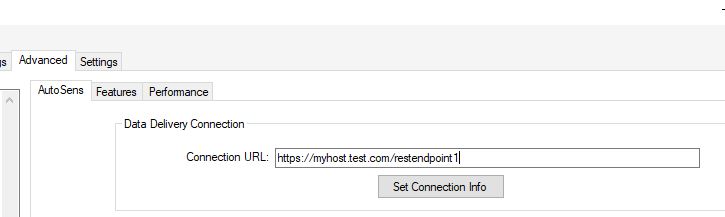
The screenshot below shows an example of setting up an encrypted channel connection to a server with hostname "myhost-test.com" with REST endpoint "restendpoint1". A couple of things to note:
Either http or https must be specified at the front of the URL. This indicates that the HTTP protocol is to be used for data delivery.
The port number is not explicitly specified in this example. You can specify the port number through the URL construction: https://hostname:port/rest/path.
The "https:" at the beginning of the connection information indicates that the encrypted channel will be used and, since no port has been explicitly specified, the connection uses the standard port 443. You would use "http:" if you wanted non-encrypted data delivery and the connection uses port 80 by default.
As long as your readers are on a network with access to a DNS server that can resolve the hostname specified, you can use the hostname instead of an IP address. However, if the readers don't have access to a DNS server, you should provide the IP address of the server instead of the hostname.
TCP Data Delivery
To collect data using the TCP connection, you need to specify both the IP address of the server as well as the TCP port that the server is listening on to collect the data from the reader. Note that for this data delivery mechanism, you can choose either CSV or JSON formatting for the data. This is discussed further in the [AutoSens Macro Programs] (~/autosens_api/macroprogram.html) pages.
The syntax for a valid connection is:
ip_address:port
Where:
- "ip_address" is the IPv4 Address of the server.
- "port"" is the TCP port that the server should be listening on to receive data from the reader.
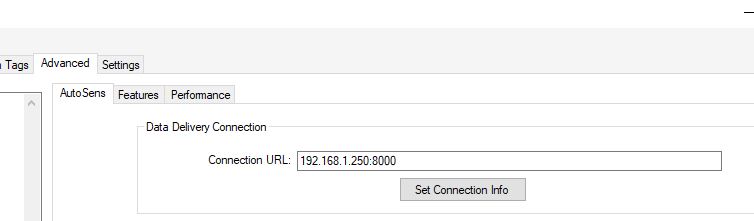
The following screenshot shows the way a TCP Connection would be set up to deliver data to a server listening on TCP port 8000 at IP address 192.168.1.250. This is formatted as "192.168.1.250:8000".
Note that we only support clear data delivery through this communication channel. We currently don't support TLS encrypted communication.